October 2026

What to Expect from Fortress Power at RE+ Las Vegas 2026

Fortress Power is heading to RE+ 2026 in Las Vegas with more to explore in residential & commercial energy storage. From expanded product options to smarter project planning and advanced energy management, we’re bringing solutions designed to help installers and developers get more out of every project.

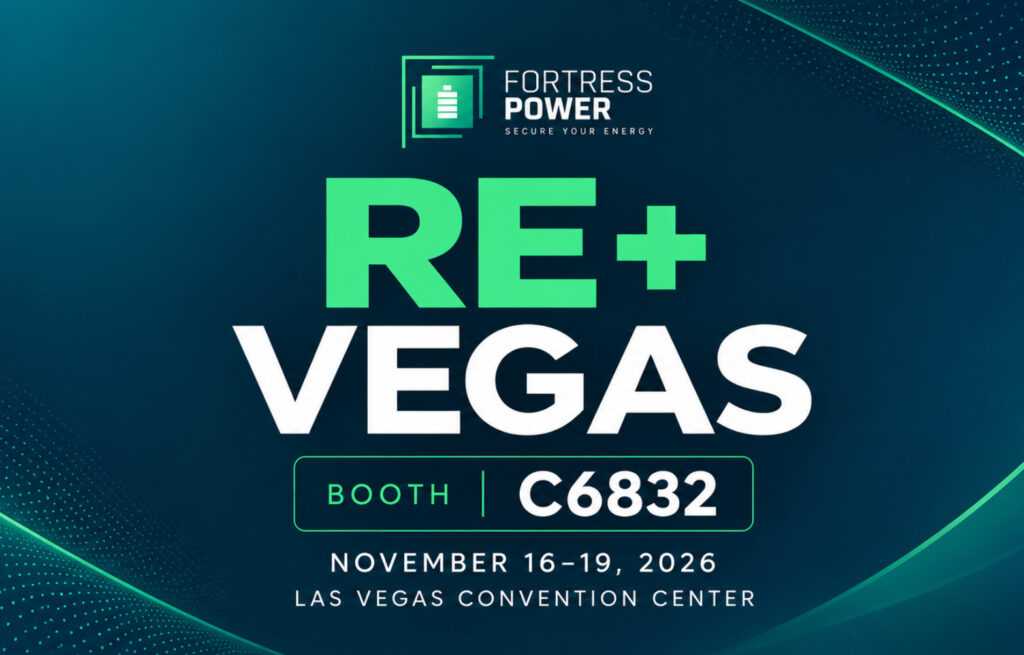
Connect with our team, discover what’s new, and see how Fortress Power can support your next installation. Here’s what you can expect when you visit us at Booth C6832 in Central Hall.

More Energy Storage Options for Residential and Commercial Projects

With evolving domestic content requirements and Foreign Entity of Concern (FEOC) restrictions, choosing the right energy storage equipment is becoming an increasingly important part of project planning.

At RE+ Las Vegas, Fortress Power will highlight its expanding portfolio of residential and commercial battery energy storage solutions, including domestic-content and Non-FEOC product options designed to support different project requirements.

Attendees can speak directly with the team about available equipment, system configurations, and solutions for eligible projects targeting up to 40% in federal Investment Tax Credits (ITC).

Whether you’re planning a residential solar-plus-storage installation or a larger commercial energy storage system, our team can help you explore the options that best fit your application.

Smarter C&I Project Planning with Keystone Designer

Sizing a commercial energy storage system involves more than selecting battery capacity. Understanding facility loads, energy costs, operating strategies, and potential financial returns is essential to developing a successful project. That’s where Keystone Designer comes in.

Visitors can explore how our C&I system sizing and financial modeling tool helps streamline project planning. With Keystone Designer, energy professionals can:

  • Size battery energy storage systems based on project requirements.
  • Evaluate system configurations and operating strategies.
  • Model potential energy savings and financial performance.
  • Build data-driven proposals for commercial customers.

Exclusive RE+ opportunity: Stop by Booth C6832 to learn how to receive 90 days of free access to Keystone Designer.

Greater Energy Control with Keystone EMS & Microgrid Controller

Installing energy storage is only part of the equation. How a system manages energy after installation can make a significant difference in long-term performance and project economics. Fortress Power will showcase how Keystone Energy Management System (EMS) and the Microgrid Controller work together to provide greater visibility and control over commercial energy resources.

Keystone EMS helps businesses optimize energy consumption, reduce peak demand charges, and identify opportunities for additional value through advanced operating strategies. Combined with the Microgrid Controller, the platform supports coordinated management of multiple energy assets. This includes battery storage, solar PV, generators, and other connected equipment. Visitors can learn how these technologies support:

  • Peak shaving and time-of-use energy optimization.
  • Site-wide energy monitoring and automated control.
  • Integration of multiple distributed energy resources.
  • Backup power and microgrid operation.
  • Improved project economics and long-term energy management.

For installers, developers, and commercial facility operators, these capabilities demonstrate how intelligent energy management can deliver value beyond battery backup.

See How the eSpire Nano Simplifies Commercial Energy Storage

Commercial energy storage doesn’t have to mean complicated installations or lengthy setup processes.

The eSpire Nano is Fortress Power’s compact, all-in-one C&I energy storage solution. It’s designed to simplify deployment while providing the flexibility needed for commercial applications. Available in 30 kW and 60 kW configurations, with 208V and 480V options, the eSpire Nano combines energy storage and power conversion in an integrated system.

One of its standout features is its streamlined setup through the Fortress Power Pro App, which allows installers to commission a single eSpire Nano in under five minutes.

At RE+ Las Vegas, attendees can learn more about the eSpire Nano’s installation process, system capabilities, and integration with Keystone EMS for advanced energy management. Commercial performance. Residential-speed commissioning.

Connect with the Fortress Power Team

Beyond exploring products and software, RE+ Las Vegas is an opportunity to connect directly with the people behind Fortress Power’s energy storage solutions.

Our team will be available to discuss residential and commercial applications, answer product questions, and help installers and developers evaluate solutions for upcoming projects. Whether you’re looking for a battery storage solution, exploring C&I opportunities, or interested in smarter energy management, we’d love to hear what you’re working on.

Visit Us at RE+ Las Vegas 2026

Join Fortress Power at the Las Vegas Convention Center from November 16–19, 2026, at Booth C6832. Come and explore our latest energy storage solutions, project planning tools, and intelligent energy management technologies.

Planning to attend? Schedule time with our team to discuss your next residential or commercial energy storage project. You can book a meeting here.
Do I Need a Fortress Power Guardian or Guardian Dongle?

When designing or servicing a Fortress Power system, choosing the right monitoring setup starts with one question: What equipment is already installed? The Guardian & Guardian Dongle both connect compatible equipment to the Fortress monitoring ecosystem, but each serves different system configurations. Existing installations, newer Envy inverters, and systems requiring direct battery-level communication may have different monitoring needs.

So, when should you use a standalone Guardian? And when does the Guardian Dongle make more sense? Below, we answer common installer questions about compatibility, parallel configurations, firmware updates, and monitoring capabilities.

I already have a Guardian Dongle. Do I also need a Guardian? 

In most cases, no. The Guardian and Guardian Dongle serve different monitoring configurations, and installers should select the appropriate device based on their equipment.

On the Envy Duo 21-G, the included Guardian Wi-Fi Dongle works with the inverter’s built-in communication board to provide inverter and Fortress battery monitoring without a separate Guardian.

On other compatible Envy inverters, the Guardian Dongle primarily communicates through the inverter. If direct battery-level communication is required, a standalone Guardian may be the better option. Always verify compatibility before adding or changing monitoring hardware.

When should I use the standalone Guardian?

The standalone Guardian is particularly useful for existing installations, retrofit applications, and compatible systems requiring direct communication with Fortress Power batteries. Depending on the configuration, it can provide battery-level monitoring and communication with compatible Envy inverters. This brings equipment information into the Fortress Power monitoring ecosystem. Keep your existing benefits list, subject to confirmation of firmware and inverter compatibility.

For installers servicing older Fortress systems, improved monitoring capabilities may be possible without replacing functioning energy storage equipment.

When does the Guardian Dongle make more sense?

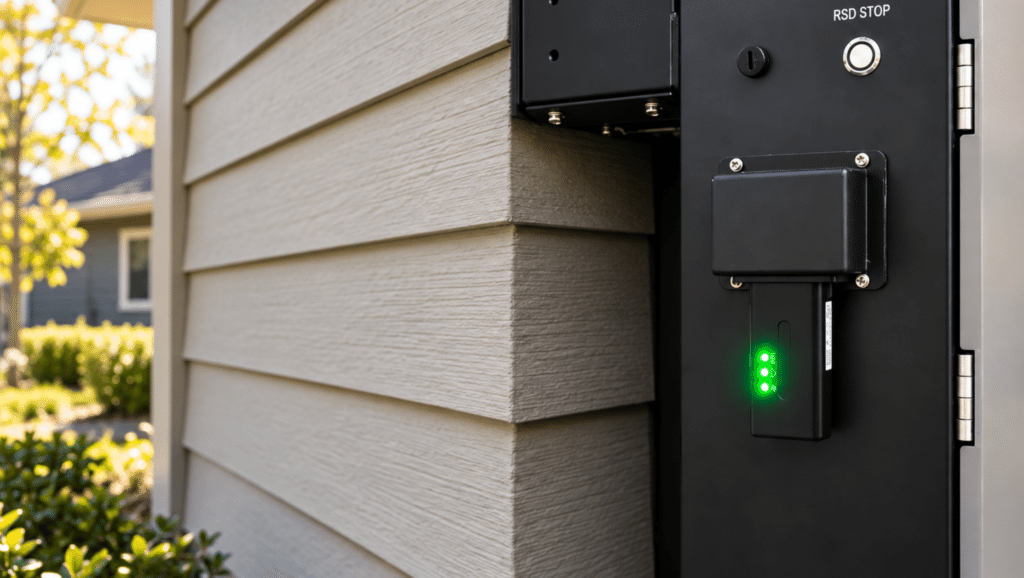
The Guardian Dongle simplifies monitoring on compatible Envy inverters by connecting directly to the inverter’s communication port. This eliminates the need for a separate monitoring enclosure. Additionally, providing access to supported inverter information through Fortress Power’s monitoring tools.

On the Envy Duo 21-G, the built-in communication board extends these capabilities to include battery monitoring. You can bring both sides of the system into one connected view.

Why is the Envy Duo 21-G different?

The Envy Duo 21-G includes a Guardian Wi-Fi Dongle. This eliminates the need to purchase, mount, or wire a separate Guardian device. Unlike configurations where the Dongle primarily communicates with the inverter, the Envy Duo 21-G features a built-in communication board that connects the inverter, battery BMS, and Guardian Dongle.

Installers are able to monitor both the inverter + connected Fortress Power batteries through the Pro App, while homeowners can access supported system information through the Owner App. Compatible monitoring information is also available through the web portal. With direct plug-in installation, cloud-based monitoring, remote support, and firmware update capabilities, the included Dongle simplifies system visibility and ongoing support.

What if I’m working on an existing Fortress Power installation?

Start by identifying the inverter and the monitoring hardware already installed. Existing Guardians can continue to support Fortress systems, making them especially useful for retrofit applications. Depending on the configuration, a Guardian can connect existing batteries and compatible Envy inverters to the current monitoring ecosystem.

Existing Guardian hardware does not necessarily need to be replaced when newer Guardian Dongle-equipped products become available.

Can I mix Guardians and Guardian Dongles on parallel inverters?

Monitoring configurations for parallel inverter systems depend on the equipment, firmware, and battery communication architecture. When expanding an existing installation or combining different generations of Fortress Power equipment, installers should verify which monitoring devices are supported for each inverter and battery bank. For mixed Guardian and Guardian Dongle configurations, consult Fortress Power support to confirm the appropriate setup before installation.


Can multiple inverters share the same battery bank across different monitoring configurations?

Shared battery banks and parallel inverter configurations require careful planning to maintain reliable communication between equipment. The supported monitoring arrangement depends on the inverter models, battery configuration, and communication architecture. Before connecting multiple inverters to a shared battery bank, confirm the supported monitoring configuration with Fortress Power to avoid communication conflicts.

How many Guardians do I need?

The number of Guardians required depends on how the batteries and inverters are configured. For systems using standalone Guardians, the monitoring layout should account for the number of inverter connections, battery banks, and  communication paths. For larger parallel systems, confirm the required number and placement of Guardians with Fortress Power before installation.

Can I use the Envy Dongle with a Guardian Dongle?

The Envy Dongle and standalone Guardian may be used together in supported system configurations because they perform different communication functions. However, installers should avoid connecting the standalone Guardian to the inverter’s INV485 port when the Envy Dongle is also in use. This can create communication interference. Verify the correct communication connections for the specific inverter and monitoring devices before installation.

Where can installers monitor the system after setup?

Installers can monitor compatible Fortress Power systems through the Pro App, with access to system information, diagnostics, and remote support capabilities. Homeowners can view supported system information through the Owner App. Additional web-based monitoring capabilities are available for supported configurations, while Keystone EMS provides advanced monitoring and energy management functionality for compatible commercial systems.

Can I remotely update firmware?

Firmware update capabilities depend on the monitoring hardware and connected equipment. The standalone Guardian supports battery firmware updates on compatible systems. However, the Guardian Dongle supports firmware management for supported inverters. On the Envy Duo 21-G, the included Guardian Wi-Fi Dongle works with the inverter’s internal communication board to connect both inverter and battery information to the monitoring ecosystem. The availability of specific remote firmware updates depends on the equipment and supported firmware configuration.

So, which monitoring setup should I use?

Choosing the right monitoring setup starts with understanding your inverter, battery configuration, and communication requirements. For existing installations or systems requiring direct battery-level communication, the standalone Guardian may be the right fit. For compatible newer Envy inverters, the Guardian Dongle offers a simpler, direct-connect monitoring solution. With the Envy Duo 21-G, the included Guardian Wi-Fi Dongle and built-in communication board bring inverter and Fortress Power battery monitoring together without additional Guardian hardware.

Have questions about the right monitoring configuration for your next installation? Contact the Fortress Power support team for help with system design, setup, updates, or troubleshooting.

The Future of C&I Energy Storage Is About More Than the Battery

A commercial energy storage system may start with a battery, but the value of that system increasingly depends on what happens around it.

Solar production changes throughout the day. Facility loads rise and fall. Utility rates can vary by time and demand. A generator may need to be coordinated during an outage. EV charging can introduce an entirely new load profile. And as utilities expand demand-response and other grid programs, stored energy can potentially serve purposes beyond the facility itself. Managing each of these pieces independently can quickly become complicated. That’s where an energy management system becomes critical.

One Platform Coordinating the Entire Site

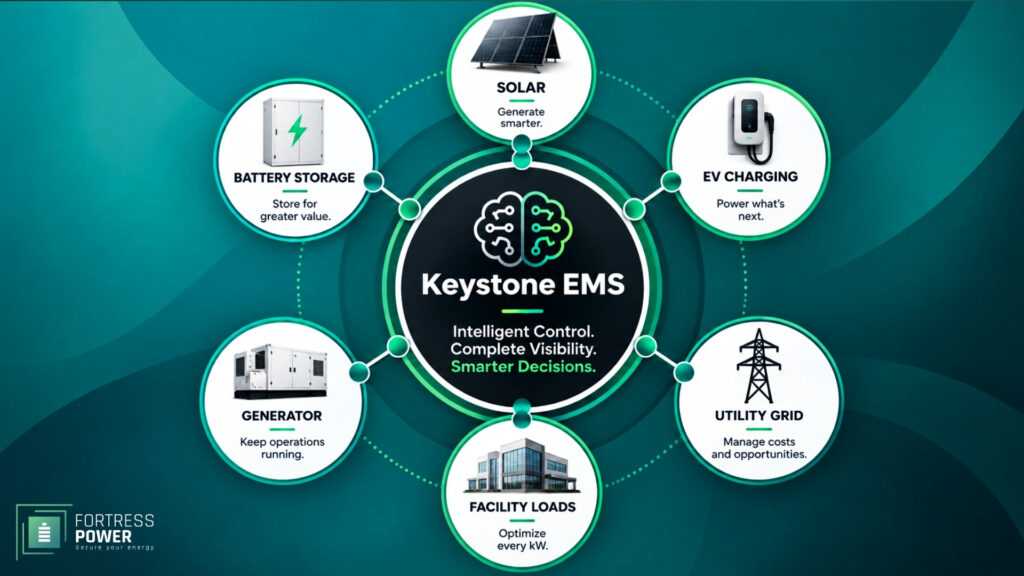
Fortress Power’s proprietary Keystone EMS controller serves as the brain of the site, coordinating energy assets and making decisions based on what is happening across the facility. Rather than treating battery storage as an isolated piece of equipment, Keystone can bring together:

  • Battery energy storage
  • Solar generation
  • Generators
  • EV charging
  • Multiple meters
  • Complex utility tariffs
  •  Demand-management schedules

This creates a single energy-management platform capable of seeing the larger picture and determining how the site’s energy resources should work together. The goal isn’t simply to collect more data. It’s to use that information to make the entire site operate more intelligently.

From Stored Energy to an Energy Strategy

A battery can charge and discharge. An EMS determines when and why it should. Consider a commercial facility with solar and storage. At one point in the day, the best use of available solar may be charging the battery. Later, stored energy may be used to reduce demand during an expensive peak period. At another time, maintaining a higher state of charge for backup may take priority.

Add EV charging, a generator, multiple meters or a more complicated utility tariff, and those decisions become increasingly interconnected. Keystone provides the control layer that allows those resources to operate as part of one strategy rather than as separate systems.

Turning Site Complexity Into Measurable Value

For a commercial customer, advanced energy management only matters if it produces a meaningful result. That value can take several forms.

Keystone can help optimize energy use around utility tariffs and demand-management schedules to pursue measurable savings. It can provide greater operational control over how and when site assets are used. And where applicable, it can support participation in grid-service programs that create additional revenue opportunities. In other words, the value isn’t the platform simply being there. It’s what the platform enables the site to do.

Built For What Comes Next

Commercial energy needs rarely stay the same. A facility that starts with solar and storage may later add EV chargers. Loads may increase as operations expand. Utility rate structures can change. New demand-management requirements or grid-service opportunities may emerge.

An energy strategy designed around today’s requirements alone can become limiting as those conditions change. Keystone provides a foundation that can adapt as more assets and more complex energy strategies are introduced. Instead of replacing the site’s energy-management approach every time its needs evolve, operators can continue coordinating those resources through the same platform.

The Battery Is Only Part of the System

As C&I energy storage becomes more sophisticated, the conversation is shifting from how much energy a battery can store to how effectively the entire site can use that energy. That requires visibility, but it also requires coordination. Keystone EMS connects batteries, solar, generators, EV charging, meters, utility tariffs and demand strategies through one intelligent control layer—helping turn individual energy assets into a coordinated system designed to deliver measurable value today while preparing the site for what comes next.

Use our C&I Project Checklist to gather the key information our team needs to evaluate your site and start building the right energy storage solution.

Commissioning an eSpire Nano in Under Five Minutes

Commissioning a commercial energy storage system doesn’t have to be a lengthy process. With the Fortress Power Pro App, installers can commission a single eSpire Nano in under five minutes, moving from initial system connection through site configuration in one guided process.

In this walkthrough, we’ll cover the complete eSpire Nano commissioning process, including connecting the Guardian Dongle, confirming equipment, configuring grid and operating settings, setting battery schedules, configuring the Smart Port and completing final system setup. Watch our quick Nano commissioning walkthrough below, or keep reading for a closer look at the process.

Start eSpire Nano Commissioning in the Fortress Power Pro App 

To begin, open the Fortress Power Pro App and log in with your installer credentials. At this point, if an app update is available, you can choose to update immediately or instead continue with the setup and return to the update later.

Once you’re logged in, navigate to the dashboard. From there, select Commission a New Site to begin setting up a new Nano system. Alternatively, the dashboard also provides access to Site Management, where existing installations can be accessed and managed after setup.

Connect the Guardian Dongle

The first stage establishes communication between the Pro App and the equipment. To begin, installers can locate the Guardian Dongle by scanning its QR code or searching for it using Bluetooth. Once the correct serial number appears, select it to establish the connection. From there, press the button directly on the Guardian Dongle to generate a verification token, which confirms physical access to the equipment during setup.

After verification is complete, connect the system to the internet using Wi-Fi or a hardwired connection. When using Wi-Fi, the Pro App displays connection information and signal strength, allowing you to confirm connectivity before moving forward. Finally, register the Guardian Dongle to the cloud to complete the connection process.

Create the Site

Once the site information is in place, it’s time to confirm the equipment being installed. To begin, select the eSpire Nano inverter and connected battery. From there, the Pro App provides a confirmation screen displaying equipment information, including serial numbers and current firmware versions.

At this stage, equipment manuals are also accessible if needed, providing additional information while working at the site.

Before continuing, review the equipment details to make sure everything is correct. Once the equipment is confirmed, move forward into system configuration.

Confirm the eSpire Nano Equipment

Once the site information is in place, it’s time to confirm the equipment being installed. To begin, select the eSpire Nano inverter and connected battery. From there, the Pro App provides a confirmation screen displaying equipment information, including serial numbers and current firmware versions.

At this stage, equipment manuals are also accessible if needed, providing additional information while working at the site.

Before continuing, review the equipment details to make sure everything is correct. Once the equipment is confirmed, move forward into system configuration.

Configure the eSpire Nano for the Site

Once the equipment is confirmed, the Pro App guides the installer through the site-specific configuration. To begin, select the single-inverter configuration for a single eSpire Nano installation.

From there, confirm the site’s wiring setup and frequency, then verify the local time zone and date. After those settings are confirmed, select whether the system will operate grid-tied or off-grid. For a grid-tied installation, enter the site’s main busbar rating. Finally, choose the appropriate grid parameters for the installation.

Keeping these selections within the same guided workflow allows installers to move from equipment connection through system configuration without switching between separate setup tools.

Select the eSpire Nano Operating Mode

The next stage determines how the eSpire Nano will operate at the site. The Pro App provides three operating modes:

  • Self-Consumption
  • Backup
  • Sell to Grid

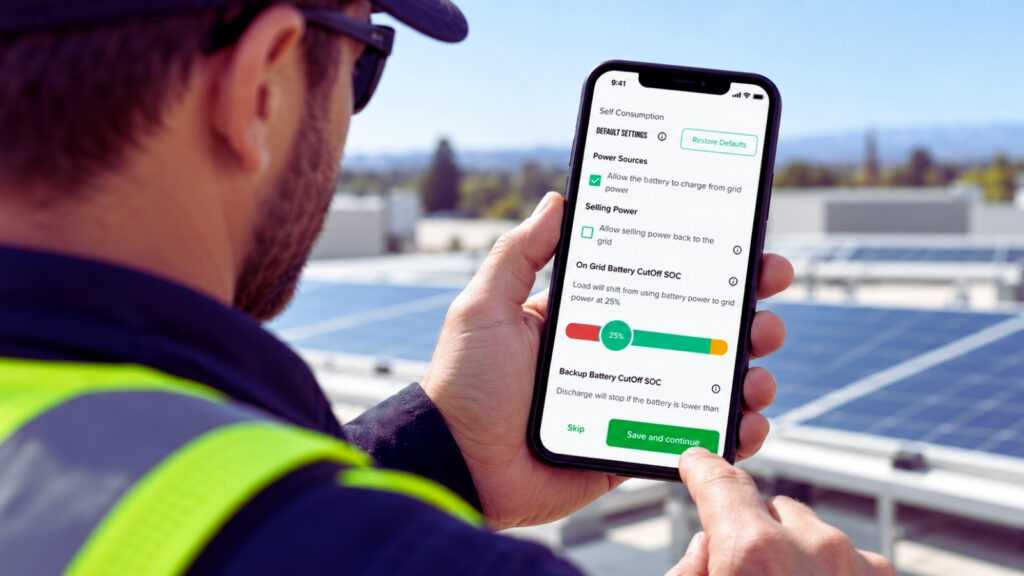
Each option includes a description within the app to provide additional context during setup. After selecting an operating mode, installers can configure settings including grid charging, grid export, export limits and battery cutoff levels. These values can be customized based on the installation, while default settings are also available when appropriate.

Configure Battery Scheduling

After the operating mode is configured, installers can move into battery scheduling. From there, select the start and end times based on how the battery should operate throughout the day. If needed, additional time periods can be added to accommodate the needs of the site.

Once the desired schedule is created, save the settings and continue. At this stage, the Pro App also displays a Peak Shaving option. Currently, Peak Shaving is configured through the Keystone web portal or directly through the eSpire Nano LCD screen, with Pro App functionality planned for a future update.

Configure the eSpire Nano Smart Port

The Smart Port gives installers the ability to configure the eSpire Nano for an additional site application.The port can be configured for one of three uses:

  • Generator
  • AC coupling
  • Smart load

One application can be connected to the Smart Port at a time. When Generator is selected, for example, the installer can enter the generator’s rated power and configure charging power and cooldown time. Battery state-of-charge thresholds can also be set to determine when the generator should turn on and when it should turn back off. Once the appropriate Smart Port settings are entered, save the configuration and continue.

Complete Setup

The Pro App provides a final summary of the eSpire Nano configuration. This gives installers an opportunity to review the grid configuration, operating mode, battery schedule, system parameters and Smart Port settings in one place.

If something needs to be changed, return to the appropriate section, make the adjustment and review the configuration again. Once everything is correct, confirm the settings to complete the process. The final screen provides an immediate look at battery state of charge and system power flow. After commissioning, installers can return to Site Management to access the system and review or adjust settings as needed.

Commercial Performance. Residential-Speed Commissioning.

For installers moving into commercial and industrial energy storage, time spent setting up a system matters.

That’s why the Nano combines commercial energy storage capabilities with a guided setup process designed to make getting a system up and running straightforward. From the start, the Pro App keeps the process within one guided workflow, from connecting equipment and confirming site information to configuring operating modes, battery schedules and Smart Port settings. As a result, installers can move through setup efficiently without adding unnecessary complexity.

Explore the Nano and see how it can fit your next C&I energy storage project.